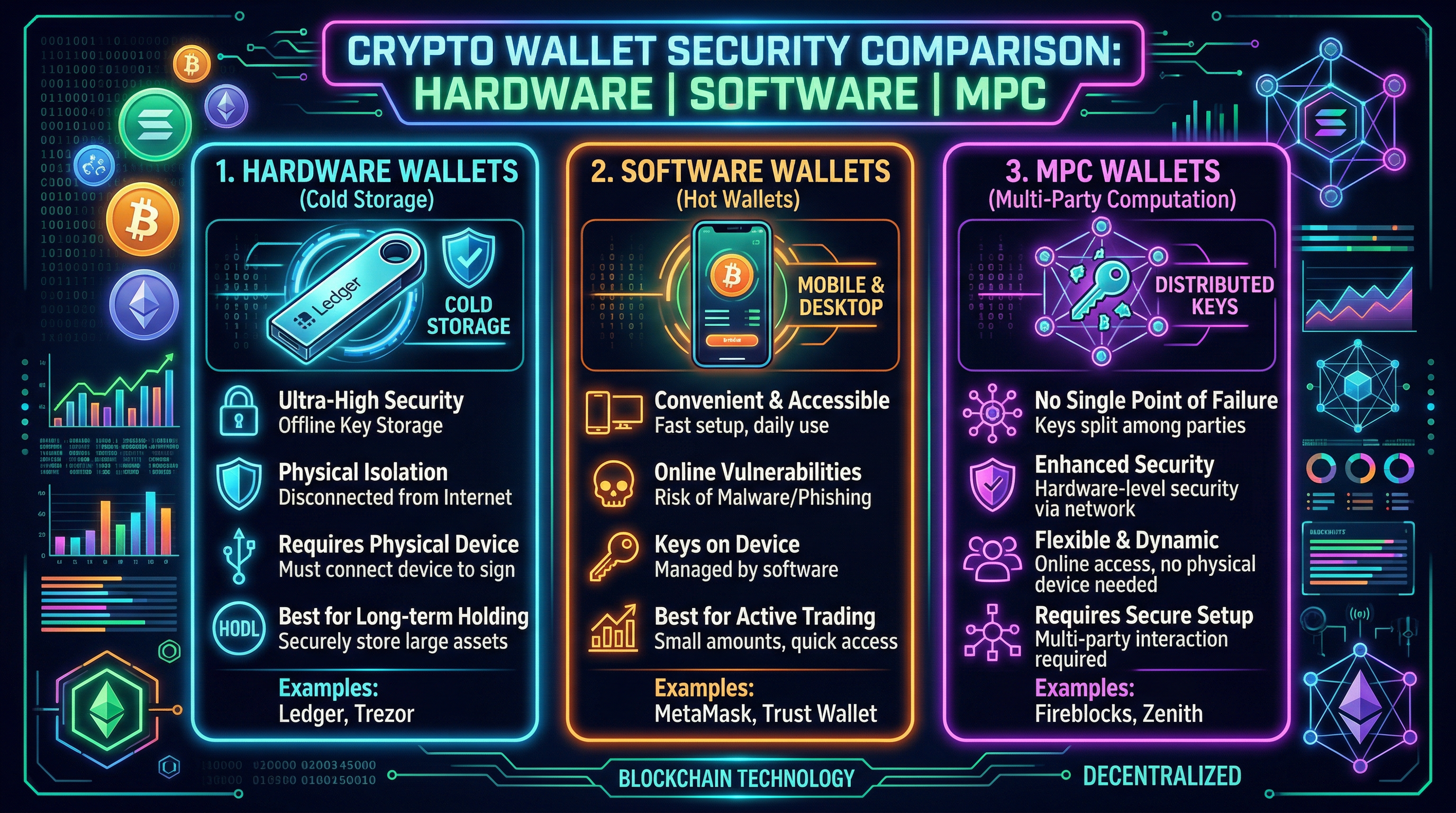
In February 2026, a crypto influencer with 2.3 million followers lost $4.7 million in a single wallet drainer attack. They were using a software wallet. They clicked a malicious "approve" on what looked like a legitimate NFT mint site. Within seconds, their entire wallet was drained by a wallet drainer contract that had pre-approved unlimited transfers of every token they held. This story is not unusual. It's happening to someone every hour.
Wallet security in 2026 is still catastrophically misunderstood by most crypto users. The choice between hardware, software, and MPC wallets — and when to use each — is one of the most important decisions you'll make in crypto. Getting it wrong means waking up to an empty wallet. Here's the complete breakdown, ranked by security and practical usability.
The 5 Types of Crypto Wallets in 2026
1. Hardware Wallets (Cold Wallets) — Ledger, Trezor
Hardware wallets store your private keys on a physical device that never connects to the internet. When you sign a transaction, the signing happens inside the device itself — your keys never leave the hardware. Even if your computer is completely compromised by malware, your keys remain secure. This is the gold standard for storing significant crypto holdings.
The 2023 Ledger Connect Kit incident: Ledger's JavaScript library was compromised, injecting malicious code into DeFi protocol front-ends. Users signing transactions while connected to affected sites had funds drained. Important note: this wasn't a hardware wallet vulnerability — the device itself remained secure. The attack targeted the connection between the wallet and dApps. Lesson: even hardware wallets don't protect you from approving malicious transactions if you're not reading what you're signing.
2. Software Wallets (Hot Wallets) — MetaMask, Phantom, Rabby
Software wallets store encrypted keys in your browser or phone. Convenient for daily DeFi use but significantly less secure than hardware wallets. The keys exist on an internet-connected device, meaning malware, browser exploits, and phishing attacks are all valid attack vectors. Never store significant crypto holdings in a software wallet long-term. Software wallets are for daily spending, like a physical wallet in your pocket — not your savings account.
3. MPC Wallets (Multi-Party Computation) — Fireblocks, Fordefi, Safe
MPC wallets split the private key into multiple "shards" held by different parties — your device, a cloud server, a backup device. No single entity ever has the complete private key. Transactions require a threshold of shards to combine and sign. This eliminates the "single point of failure" vulnerability of traditional wallets while maintaining recovery options. Used heavily by institutions and increasingly by sophisticated retail users.
Coinbase's "Smart Wallet" product is an MPC wallet — no seed phrase required, recovery through biometrics or multiple devices. It represents the future of wallet UX but introduces new trust assumptions (Coinbase holds one shard of your key).
4. Multisig Wallets — Safe (Gnosis Safe)
Multi-signature wallets require M-of-N private keys to sign any transaction. For example: a 2-of-3 multisig means two out of three designated wallets must sign before any transaction executes. Used by virtually every major DeFi protocol treasury (Uniswap, Aave, Compound all use Safe multisigs for their funds). Becoming more accessible for retail users.
5. Custodial Exchange Wallets — Coinbase, Kraken, Binance
Not a self-custody wallet at all — the exchange holds your keys ("not your keys, not your crypto"). Convenient for trading but you're trusting the exchange. Post-FTX, the world knows what exchange insolvency looks like. For long-term storage, always self-custody. For active trading on a regulated platform, Traderise provides custody solutions with institutional-grade security controls.
The correct setup for a serious crypto holder in 2026: Ledger or Trezor for your long-term holdings (95%+ of portfolio). MetaMask or Rabby connected to hardware wallet for DeFi interaction. A completely separate "burner" software wallet funded with only what you need for risky DeFi activity. Safe multisig for anything over $100K. Never approve unlimited token allowances from your main wallet.
Trade Crypto Smarter
Traderise gives you multi-asset access, real-time portfolio tracking, and low fees. Built for degens who want an edge.
Try Traderise FreeThe Most Common Wallet Attacks in 2026 (And How to Avoid Each)
1. Wallet Drainer Contracts ($1.5B+ stolen in 2025)
How it works: You connect your wallet to a malicious dApp (fake NFT mint, fake airdrop claim, fake DEX). The site asks you to sign a transaction that looks like a mint or claim but is actually an "approve" transaction granting the attacker unlimited spending rights on your tokens. Once approved, they drain everything instantly.
Defense: Use Rabby Wallet (which shows you exactly what permissions you're granting before you sign), or use the free Revoke.cash tool to review and revoke all existing approvals monthly. Never approve "unlimited" spending for any unknown contract.
2. Seed Phrase Phishing
How it works: You get a pop-up, email, or DM claiming your wallet needs to be "verified" or "synced" by entering your 12/24-word seed phrase on a website. There is NO legitimate reason to ever enter your seed phrase on a website. Ever. The website is a scam.
Defense: Understand that your seed phrase NEVER goes online. Store it on paper (or metal if you're serious) in a physically secure location. Never type it anywhere. Anyone asking for it is a scammer.
3. Clipboard Malware
How it works: Malware on your computer monitors your clipboard. When you copy a crypto address, it silently replaces it with the attacker's address. You paste and send funds to the attacker's wallet without noticing.
Defense: Always verify the first 5 and last 5 characters of any address before confirming a transaction. Never just glance at the middle of an address.
4. SIM Swap Attacks
How it works: Attackers social-engineer your mobile carrier into transferring your phone number to a SIM they control. They then use SMS-based 2FA to access your exchange accounts and drain them.
Defense: Never use SMS 2FA for any crypto account. Use Google Authenticator or a hardware key (YubiKey). Call your carrier and add a PIN or passcode requirement for any account changes.
Setting Up the Gold Standard Wallet Stack
Layer 1: Cold Storage
Ledger Nano X or Trezor Model T for 90%+ of holdings. Purchase directly from the manufacturer — never from Amazon or third-party sellers (tampered devices are a real thing). Set up from scratch with a fresh seed phrase. Store seed phrase on fireproof metal (Cryptosteel, Bilodal) in a secure location, separate from the device. Passphrase-protect it for maximum security.
Layer 2: DeFi Wallet
Connect your Ledger/Trezor to MetaMask or Rabby as the "connected hardware wallet." This means even your DeFi transactions require physical confirmation on the device. Use this wallet for protocol interactions with established, audited protocols only. Keep maximum 5–10% of portfolio here.
Layer 3: Burner Wallet
A separate, completely fresh software wallet (not connected to your hardware wallet) funded with only what you need for any risky activity — new protocol exploration, experimental mints, anything you found on Twitter. Max $500 in this wallet at any time. Treat it as consumable. If it gets drained, $500 is the maximum loss.
For managing your portfolio across all these wallet layers, Traderise's portfolio tracker consolidates all your wallet addresses into a single dashboard — see your total holdings without connecting wallets to anything risky.
Secure Your Crypto — Then Trade It
Traderise gives you secure crypto access with institutional-grade infrastructure, real-time portfolio tracking, and multi-asset trading. Set up right, trade confidently.
Try Traderise Free